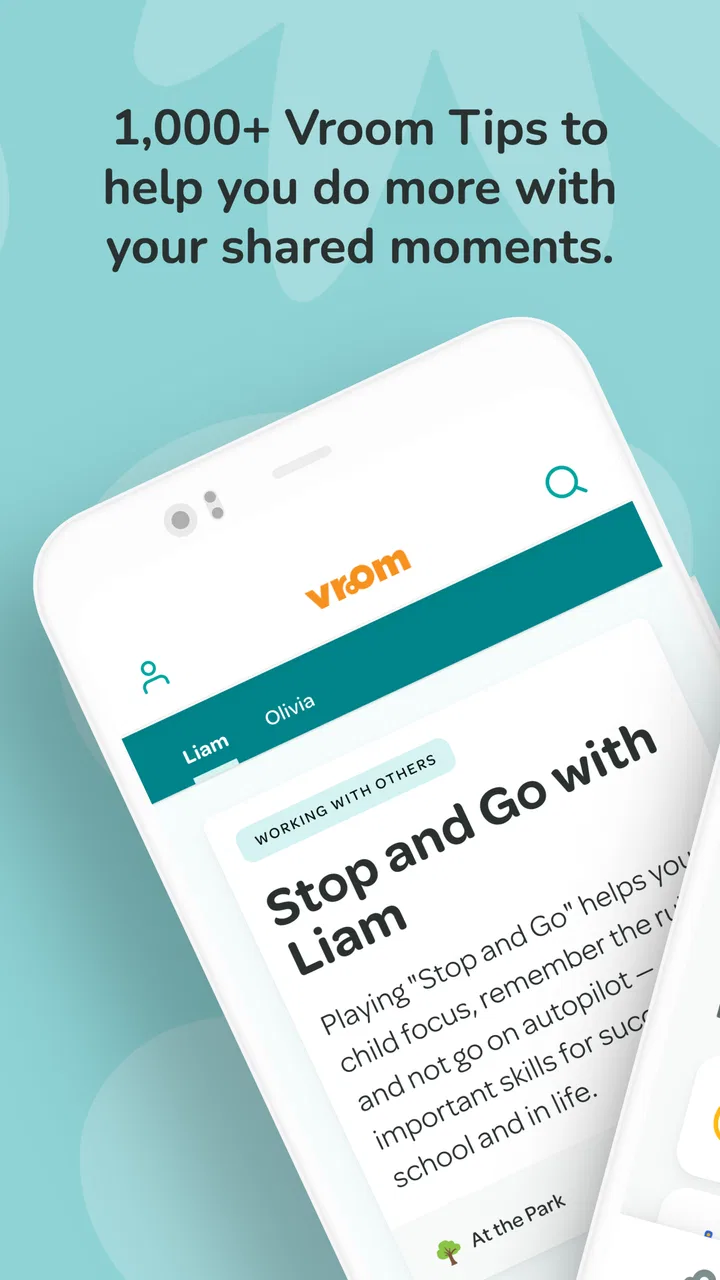
Vroom: Early Learning
- 4.0
- Rating
- 100.00K
- Installs
- Free
- Price

 Analysis by App-foxy
When I first tried Vroom: Early Learning, I understood its appeal quickly: it turns ordinary moments with a baby or toddler into small opportunities for interaction. Rather than asking a parent to prepare a lesson, it suggests ways to talk, notice, count, compare, move, and respond during routines that are already happening. That makes it feel less like a traditional educational program and more like a practical prompt book in app form.
This free parenting app comes from the Bezos Family Foundation, and its central idea is refreshingly simple. Early learning does not have to mean worksheets, flashcards, or a carefully arranged activity table. A conversation while getting dressed, a pause during a walk, or a playful response at mealtime can all support a child’s development. In my experience, that approach is the strongest reason to keep using it: it fits family life instead of demanding that family life stop for a lesson.
It is aimed at everyone and has passed the point of being a new experiment, having first appeared on March 28, 2014. The current release is version 3.9.5, and the app has reached more than one hundred thousand installs. Its average score is four out of five from roughly one thousand two hundred ratings, with about four hundred eleven written reviews. Those figures suggest a useful, established tool rather than a niche curiosity, although they do not remove the need to decide whether its presentation suits your household.
You May Also Like

 Blood Strike: 2.5 Anniversary
Blood Strike’s Loadouts Turn Every Drop Into a Tactical Gamble
A close look at Blood Strike’s custom loadouts: how fast access to signature weapons reshapes its battle royale rhythm, rewards preparation, and narrows the gap between fights.

 Pandora - Music & Podcasts
Pandora’s Music Is Easy to Start, but Harder to Recover
Pandora’s strength is its low-effort path from a seed to a station. Its weak spot is how much confidence it asks you to place in connection, setup, and quiet recovery.

 8 Ball Pool
 Is Built on Rivalries, Rematches, and Routine
A close look at the rivalries, rematches, shared routines, and unanswered safety questions that turn a quick pool match into a persistent mobile community.

 Samsung Music
’s Quiet Strength Is Playing What You Already Own
Its reach comes less from spectacle than from dependable access to a personal library. That simplicity is both the app’s strongest retention engine and its ceiling.

 AccuWeather: Weather Radar
AccuWeather Review: A Quick, Clear Forecast for Everyday Decisions
For everyday plans, the best forecast is the one you can understand quickly. AccuWeather makes rain timing, radar, and local conditions easy to act on, with a few trade-offs.

 Hill Climb Racing
Why Hill Climb Racing Still Turns Crashes Into One More Run
A tiny car, a bumpy hill and one more upgrade: Hill Climb Racing keeps resurfacing because its simple chaos makes every near-miss feel personal.
More From Our News Desk



How Vroom works in real family routines
The app’s most useful contribution is not teaching a child to sit still and complete a task. It helps the adult change the quality of an interaction. A simple prompt can encourage you to wait for a response, describe what your child is doing, introduce a new word, or invite a comparison. That is a meaningful distinction from many early-learning alternatives, which often focus on direct instruction or passive screen content.
I found the approach especially practical for parents who know they want to support development but do not always know what to say next. The suggestions give a starting point without requiring specialist knowledge. You can use one idea in a few minutes, adapt it to the child’s mood, or ignore it entirely when the moment is not right. The app works best as a gentle nudge, not as a schedule that must be completed.
A realistic example is a rushed morning. While putting on socks, I might describe the colors, ask which foot should get the sock, pause before handing it over, and let the child try. That combines language, choice, attention, and a little independence without adding a separate activity. If the child is tired, the same idea can become a short conversation rather than a task. This flexibility is more valuable than a large library of activities that require preparation.
Readability and navigation for busy caregivers
The experience is most approachable when I treat it as a quick-reference tool. I can open it looking for an idea rather than needing to understand a complicated course structure first. That matters when one hand is occupied, a child is waiting, or I only have a moment before moving on to the next part of the day.
The language is generally easier to use when read aloud or adapted into a parent’s own words. A caregiver does not need to repeat a prompt exactly. In fact, doing so can make the interaction feel unnatural. The better workflow is to read the suggestion privately, understand the purpose, and then express it in the family’s normal voice. This is a small but important distinction for adults who feel uncomfortable with scripted educational language.
For readers with different literacy levels, the app’s value depends on how comfortable they are interpreting short suggestions and turning them into conversation. A parent who prefers direct, highly visual instructions may find some ideas less immediately obvious than an activity card with pictures and numbered steps. I would recommend spending a little time previewing several prompts before using them with a child, especially if another caregiver will be sharing the routine.
Navigation also has a social dimension. The app is easier to use when a family agrees that prompts are invitations rather than tests. If one adult expects every suggestion to be followed precisely, the experience can become stressful. I got more from it when I selected one idea, tried it naturally, and moved on instead of treating the app like a checklist.
Motor and sensory considerations
Because the learning happens largely through adult-child interaction, the app can be more adaptable than a toy or game that assumes one physical ability. A prompt involving movement can be changed into a verbal observation. An activity that seems suited to standing can be explored while sitting. A child who does not want to touch an object can still watch, listen, point, or choose between spoken options.
That flexibility is one of the most inclusive aspects of the concept, but it comes from the caregiver’s adaptation rather than from a promise that every activity will suit every child. Parents should feel free to remove any physical step that causes discomfort, fatigue, frustration, or sensory overload. The educational goal is usually more important than the exact action suggested.
For a child who is sensitive to noise, texture, movement, or crowded surroundings, I would use the app during a calm routine and keep the interaction brief. A quiet description of what is happening may work better than an energetic game. Similarly, a child with limited mobility can still participate in turn-taking, naming, matching, noticing changes, and making choices. The adult may need to provide the materials or change the position, but the prompt can remain useful.
There is also a practical screen consideration. The child does not need to stare at the phone for the app to do its job. In many cases, it is better for the adult to glance at a suggestion and put the device aside. That reduces the chance that the phone becomes the focus of the interaction and makes the activity easier to include for children who do not enjoy screens.
One advanced habit I recommend is preparing prompts before a difficult transition. If bath time, leaving the house, or waiting in a queue tends to be challenging, I would look through the app earlier and choose an idea that matches the child’s energy and physical comfort. This avoids trying to browse while managing a frustrated child and makes the tool more accessible in practice.
Situational access at home and outside it
Vroom is particularly well suited to families who need learning ideas that travel. A caregiver can use its approach at home, in a stroller, during a meal, or while waiting for an appointment. The lack of a formal setup is a real advantage for grandparents, babysitters, and parents who share care across different places.
It can also support adults who do not have access to many educational toys. A conversation about what is in the kitchen, the sound of a vehicle, or the steps in washing hands can become a learning moment. That makes the app more practical than alternatives that assume craft supplies, printed materials, or a quiet playroom.
For multilingual families, the prompts can serve as ideas rather than fixed scripts. A caregiver can use the family’s strongest language, introduce words in more than one language, or invite another relative to lead the interaction. The app itself does not replace a family’s language choices; its usefulness comes from the underlying activity, such as noticing, describing, waiting, and responding.
Its design also suits adults who have limited time or unpredictable schedules. You do not need a long uninterrupted session to benefit from one suggestion. A parent working irregular hours can choose a prompt when available, while a caregiver with several children can adapt the same idea to different ages. The trade-off is that the app does not create a complete care plan. It offers moments, not a timetable.
This is where it differs from video-based learning apps. A video can occupy a child while an adult handles another task, but Vroom depends on the adult’s participation. That may be more demanding, yet it also makes the experience more responsive. You can slow down, repeat, change the wording, or stop when the child has had enough. For families seeking independent entertainment, another category of app will be a better fit.
Remaining barriers and points of friction
The biggest limitation is that the quality of the result depends on the caregiver’s interpretation and energy. On a calm day, a prompt can spark a warm exchange. During exhaustion, illness, or a difficult transition, even a simple suggestion may feel like another responsibility. I would not use the app to judge whether I am doing enough as a parent; that would undermine its best feature, which is its low-pressure spirit.
Some families may also prefer more structured progression. If you want clear milestones, lesson sequences, printable practice, or a record of completed activities, this is not the strongest alternative. Its open-ended format is helpful for flexibility but less satisfying for someone who wants visible advancement. A developmental professional’s guidance may also be more appropriate when a parent has specific concerns about communication, movement, hearing, vision, or behavior.
Another barrier is shared access. If several adults care for the same child, the app is most effective when everyone understands that the prompts can be modified. Without that shared understanding, one caregiver may use the ideas playfully while another turns them into instructions. A short conversation between adults can prevent that mismatch.
Families with limited digital confidence may need a little orientation before the app becomes genuinely convenient. The content is intended to support interaction, but the adult still has to choose an appropriate moment and translate the prompt into action. I would start with familiar routines rather than attempting something new in a public or stressful setting.
There is also a boundary worth keeping clear: this is a parenting resource, not a substitute for individualized support. If a child consistently struggles with a skill or seems distressed by ordinary sensory experiences, an app prompt should not be treated as an assessment or treatment plan. Its role is to encourage responsive everyday interaction, while qualified professionals address concerns that require closer attention.
Who will benefit most from it?
I would recommend it to a new parent who wants practical ideas without buying a collection of materials, to a grandparent looking for ways to play meaningfully, and to caregivers who prefer learning through conversation and shared attention. It is also a good option for families who dislike child-directed screen entertainment and want the phone to support the adult rather than replace the adult.
It may be less suitable for a parent who wants the child to use an app independently, a family looking for formal academic instruction, or anyone expecting detailed personalization for a particular developmental need. In those cases, a structured curriculum, an interactive toy, a specialist resource, or simply a professional conversation may be more useful.
One of my favorite ways to use it is to choose a single prompt for the day and connect it to something the child already enjoys. If the child likes vehicles, I can use a travel routine for sounds, speed, size, or direction. If the child prefers water play, I can focus on full and empty, warm and cool, floating and sinking, while respecting sensory limits. The app becomes a source of ideas, but the child’s interests decide whether the moment succeeds.
An inclusive verdict for everyday early learning
Vroom: Early Learning is a thoughtful free app for turning ordinary caregiving into responsive learning. Its strongest quality is not a flashy interface or a promise of accelerated progress. It is the way it reminds adults to notice what children are already doing and respond with more intention.
From an inclusion perspective, the interaction-first model gives families room to adapt activities for different movement styles, communication preferences, sensory needs, languages, and settings. That is valuable, but it should not be confused with universal suitability. Some prompts will need changing, some moments will need skipping, and some children will need support beyond what an app can offer.
The app is suitable for everyone, costs nothing to try, and runs on Android devices using version 8.0 or later. Those practical details make it easy to consider, while its four-point average from its user community gives a reasonable indication that many caregivers find it worthwhile. I would approach it as a flexible companion rather than a program to complete.
My final recommendation is simple: install it if you want small, realistic ways to talk and play with a young child, especially when time, space, or materials are limited. Keep the phone in the background, choose prompts that respect the child’s abilities and mood, and let real interaction lead. Used that way, Vroom: Early Learning offers something many early-learning alternatives miss: a reminder that an ordinary moment can be enough.
FAQs for Vroom: Early Learning
01What age group is Vroom: Early Learning designed for?
Vroom: Early Learning is tailored for children from birth to five years old. The app focuses on providing age-appropriate activities and resources that stimulate brain development during these crucial early years. Parents and caregivers can use the app to engage young minds with simple, everyday activities that support cognitive growth.
02Does Vroom: Early Learning require internet access to function?
While many features of Vroom: Early Learning can be accessed offline, some resources and updates do require an internet connection. This includes downloading new activities and syncing progress across devices. However, once content is downloaded, most activities can be enjoyed without a constant connection, making it convenient for on-the-go use.
03Are there any in-app purchases or advertisements in Vroom: Early Learning?
Vroom: Early Learning is completely free to use and does not contain any in-app purchases or advertisements. The app is developed by a non-profit organization dedicated to supporting early childhood development, ensuring a safe and distraction-free environment for both children and parents.
04How does Vroom: Early Learning support different learning styles?
Vroom: Early Learning caters to various learning styles by offering a range of activities that include visual, auditory, and kinesthetic elements. This diversity helps engage children with different preferences and reinforces learning through multiple modes, enhancing overall developmental outcomes. Activities are designed to be inclusive, ensuring every child can benefit.
05Can parents track their child’s progress in Vroom: Early Learning?
Yes, parents can monitor their child’s progress through the app’s intuitive tracking system. Vroom: Early Learning allows caregivers to log activities and milestones, providing insights into the child’s developmental journey. This feature helps parents understand their child’s growth areas and tailor activities to suit their unique learning needs.
Pros
- Engaging educational content for kids.
- Colorful and intuitive user interface.
- Offline access available for learning anywhere.
- Regular updates with new learning modules.
- Parental controls ensure safe app usage.
Cons
- Limited free content without subscription.
- Requires internet for initial downloads.
- Can be resource-heavy on older devices.
- In-app purchases may be distracting.
- No multilingual support available yet.

Vroom: Early Learning
Gallery